Executive Virtual Assistant: What They Do and What to Delegate
An executive virtual assistant is a remote professional who provides high-level administrative support to a business owner, executive, or leadership team. Where a general virtual assistant often handles a defined list of tasks, an executive virtual assistant works closer to the leader: managing the calendar and inbox, preparing for meetings, coordinating travel, following up on decisions, and protecting the executive's time.
For busy leaders, the right virtual executive assistant can improve productivity, keep complex schedules under control, and create more deep work time for strategy, clients, and the team.
This guide explains what an executive virtual assistant does, how the role differs from a general virtual assistant and an in-house executive assistant, which tasks to delegate first, the skills to look for, and how to set the relationship up so it works from the first week.

What Is an Executive Virtual Assistant?
An executive virtual assistant, sometimes called a virtual executive assistant, provides the kind of support an in-office executive assistant would, but works remotely. The U.S. Bureau of Labor Statistics describes executive secretaries and executive administrative assistants as workers who provide high-level support for an office and for top executives, often handling complex responsibilities such as reviewing incoming documents, conducting research, and preparing reports. An executive virtual assistant does much of the same work through shared calendars, email delegation, cloud documents, and video calls. A remote virtual assistant at the executive level is not an entry level position. It is a remote professional who takes ownership of administrative tasks and operational support so the executive can stay focused on decisions only they can make.
The BLS counted 489,300 executive secretary and executive administrative assistant jobs in 2025, with a median annual wage of $76,590 in May 2025. It also notes that these roles typically require several years of related administrative experience. That experience is what separates executive support from entry-level task work.
What Does an Executive Virtual Assistant Do?
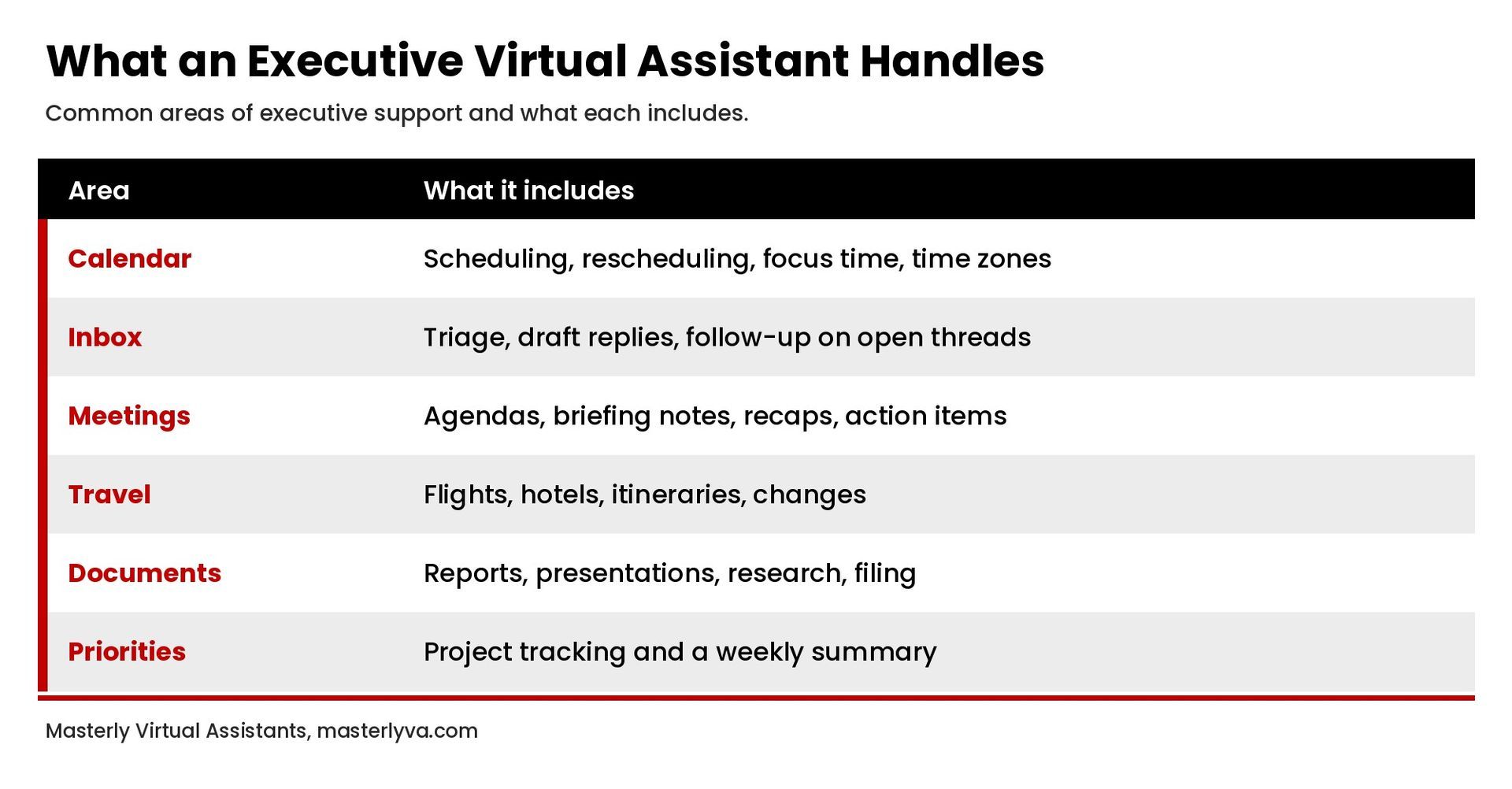
The exact duties depend on the executive, but most executive virtual assistant work falls into a few areas.
Calendar and schedule management
The assistant owns the executive's calendar: scheduling meetings, rescheduling when plans change, protecting focus time, managing time zones, and preventing double bookings. Good calendar management also means planning around personal appointments, travel days, and the executive's preferred working style, such as no calls before 10 a.m. or meetings grouped on certain days. Our guide to calendar management covers this in detail.
Inbox and communication management
An executive assistant triages the inbox, handles drafting responses to routine messages for approval, flags what needs the executive's attention, and manages follow ups on open threads. Strong inbox management keeps external contacts, clients, and the executive team from waiting on answers. See our guide to inbox management for a practical system.
Meeting preparation and follow-up
Before meetings, the assistant gathers agendas, background documents, and attendee notes. Afterward, they record action items, send follow-up emails, and track deadlines so decisions do not stall.
Travel coordination
Travel planning includes booking flights, hotels, and ground transportation, building itineraries, and adjusting plans when schedules change. For external events such as conferences or client visits, the assistant can also coordinate registrations, meeting times, and materials.
Document preparation and research
Formatting presentations and reports, organizing files, preparing briefing notes, and researching people, companies, or topics before a meeting or decision.
Project and priority tracking
Keeping a running list of open projects, reminding stakeholders of deadlines, and giving the executive a short weekly summary of where things stand.
Gatekeeping
Screening requests for the executive's time, routing questions to the right person on the team, and keeping low-priority items off the executive's plate.
Personal tasks
Many executives also delegate personal tasks that compete for their time, such as scheduling personal appointments, managing family calendars, booking reservations, or handling renewals. Agree on which personal tasks are in scope so the assistant knows where support starts and stops.
Light operations support
Some executive assistants also help with business operations: data entry in a CRM, tracking invoices for approval, maintaining contact lists, or coordinating with vendors. This operational support works best when there is a documented process to follow.
Executive Virtual Assistant vs. General Virtual Assistant
Both roles are remote, but the scope is different.
- Focus. A general virtual assistant usually completes defined tasks, such as data entry, scheduling, or social media posting. An executive virtual assistant supports one leader or a small leadership group across many moving parts.
- Judgment. Executive support requires deciding what matters, what can wait, and what needs escalation. The assistant often speaks on the executive's behalf with clients, partners, and staff.
- Access. An executive assistant usually has delegated access to email, calendar, and sensitive documents, which requires a high level of trust and discretion.
- Experience. As the BLS notes, executive assistants typically bring several years of administrative experience.
For a broader list of delegable work, see our guide to virtual assistant tasks.
Who Benefits From a Virtual Executive Assistant?
A virtual executive assistant is a good fit for leaders whose calendar, inbox, and follow ups take more time than they should. Common examples include:
- Founders and small business owners who handle sales, operations, and administration themselves.
- C suite executives who need dedicated support but whose company does not yet have an in-house executive assistant for every leader.
- Attorneys, consultants, and advisors whose time with clients is their most valuable hour.
- Speakers, coaches, and authors who manage bookings, travel, and many external contacts.
- Executive teams that want one assistant to coordinate shared meetings and planning sessions.
If you regularly work evenings to catch up on email and scheduling, that is a sign the work could be delegated.
Executive Virtual Assistant vs. In-House Executive Assistant
An in-house executive assistant works on site, often full time, as an employee. A virtual executive assistant works remotely and may be engaged for a set number of hours or as part of a service arrangement. The main tradeoffs:
- Presence. In-house assistants can handle physical tasks such as greeting visitors, managing office supplies, or running errands. Virtual assistants cannot.
- Flexibility. Virtual support can often scale up or down with the executive's needs.
- Overhead. Remote support avoids office space and equipment for the assistant. Total cost depends on the hours, experience level, and arrangement, so compare options on the full scope of work rather than an hourly rate alone.
Tasks to Delegate to an Executive Virtual Assistant First
If you are new to executive support, start with work that is frequent, time-consuming, and easy to define:
- Scheduling. Give the assistant access to your calendar and a short list of scheduling preferences.
- Inbox triage. Agree on labels or folders, which messages the assistant can answer, and which always come to you.
- Meeting follow-up. Have the assistant send recaps and track action items after recurring meetings.
- Travel booking. Share your preferences once, such as airlines, seat choices, and hotel standards.
- Weekly priorities summary. Ask for a short Friday summary of open items, upcoming deadlines, and next week's calendar.
Once those run smoothly, add research, document preparation, and project tracking.
Freelance Virtual Assistant vs. Managed Service
There are two common ways to work with an executive virtual assistant.
- Freelance or independent assistant. You find, vet, and manage the assistant directly. This can work well, but the hiring process, training, and backup coverage are your responsibility.
- Managed service. A virtual assistant company matches you with an assistant, and often provides an account manager who handles onboarding, quality checks, and coverage when your assistant is unavailable. This model can reduce hand holding on the hiring side and help you find the right person faster.
Whichever model you choose, ask how the assistant is matched to your needs, how confidentiality is handled, what happens if the fit is not right, and how hours are tracked.
Skills to Look for in an Executive Virtual Assistant
- Clear written communication. Much of the work is email and messaging on your behalf.
- Organization and follow-through. Nothing should fall through the cracks.
- Discretion. The assistant will see confidential business and personal information.
- Sound judgment. Knowing when to act, when to ask, and when to escalate.
- Tool fluency. Comfort with calendar, email, document, video, and project management tools.
- Professional presence. The assistant often represents you to clients and partners.
- Problem solving. When a flight is canceled or a meeting conflict appears, the assistant should bring options, not just the problem.
- Taking ownership. The best executive assistants treat your priorities as their own and close loops without reminders.
- Comfortable working independently. Working remotely means fewer quick check-ins, so the assistant must manage their own time well.
- Ability to build relationships. An assistant who builds relationships with your clients, staff, and partners makes every interaction smoother.
Clear communication matters on your side too. The more you explain your goals and preferences, the faster an assistant can deliver high quality support.
How to Hire an Executive Virtual Assistant
- List the work. Track your administrative tasks for one or two weeks and note how long each takes.
- Write a short job description. Describe the responsibilities, tools, hours, time zones, and the experience level you need.
- Interview for judgment. Ask candidates how they would handle a scheduling conflict, a sensitive email, or a last minute travel change.
- Start with a trial period. Begin with a defined set of tasks and review the results after a few weeks.
- Plan for training. Even experienced assistants need time to learn your systems, contacts, and preferences.
Some assistants also pursue professional development, such as administrative certifications or training in project management tools, which can be a useful signal of commitment to the role.
How to Set Up an Executive Virtual Assistant for Success
- Write down your preferences. Meeting rules, working hours, communication style, and the people who always get through.
- Use secure, delegated access. Grant access through calendar and email delegation and a password manager rather than sharing passwords in messages.
- Set a daily or weekly check-in. A short standing call keeps priorities aligned, especially in a fast moving week.
- Define decision rights. Be clear about what the assistant can approve, decline, or commit to without asking.
- Give feedback early. Small corrections in the first few weeks save time later.
- Review and expand. After a month, look at what is working and hand off the next layer of work.
Frequently Asked Questions
What does an executive virtual assistant do?
An executive virtual assistant manages a leader's calendar and inbox, prepares for and follows up on meetings, coordinates travel, prepares documents and research, tracks priorities, and screens requests for the executive's time, all remotely.
How is an executive virtual assistant different from a regular virtual assistant?
An executive virtual assistant supports a specific leader across many responsibilities and uses more judgment and delegated access. A general virtual assistant typically completes defined tasks.
What skills should an executive virtual assistant have?
Strong written communication, organization, discretion, sound judgment, comfort with business software, and a professional presence with clients and partners.
How many hours of support does an executive need?
It depends on the volume of meetings, email, and travel. Many executives start with a part-time arrangement and increase hours as more work is handed off. Tracking your administrative time for a couple of weeks gives you a realistic starting point.
Is a virtual executive assistant right for a small business owner?
Often, yes. Owners who spend significant time on scheduling, email, and follow-up can delegate that work and focus on clients, team, and growth. Start with a small set of tasks and expand as trust builds.
Get Executive Support That Fits How You Work
An executive virtual assistant gives you back time for the work only you can do. To learn how Masterly Virtual Assistants supports executives, attorneys, and business owners, visit our executive and legal assistance page or contact us.