Virtual Assistant Tasks: What to Delegate, With Examples
Virtual assistant tasks are the administrative, operational, creative, and technical jobs a remote assistant can handle so a business owner or team can focus on higher-value work. The list is broader than most people expect. A virtual assistant can manage an inbox for your company, schedule meetings, enter data, coordinate travel arrangements, support social media, research vendors, and keep projects moving, all without sitting in your office.
For many business owners, outsourcing these tasks is the first step toward a business that does not depend on them for every detail. The challenge for most entrepreneurs is not knowing whether a virtual assistant can help. It is knowing which tasks to hand off first and how to delegate them well. This article breaks down common virtual assistant tasks by category, gives real world examples, and explains how to choose and assign the right work.

What Does a Virtual Assistant Do?
A virtual assistant, often shortened to VA, is a remote professional who supports a business owner, executive, or team with recurring tasks. Some VAs are generalists who handle a wide mix of administrative tasks. Others specialize in areas such as bookkeeping support, graphic design, video editing, or web development.
The core job of a virtual assistant is to take time consuming, repeatable work off your plate so you spend less time on operations and more time on clients, sales, and strategy. Because the work is remote, communication, documented processes, and shared tools matter more than they would with an assistant in the same office.
Common Virtual Assistant Tasks by Category
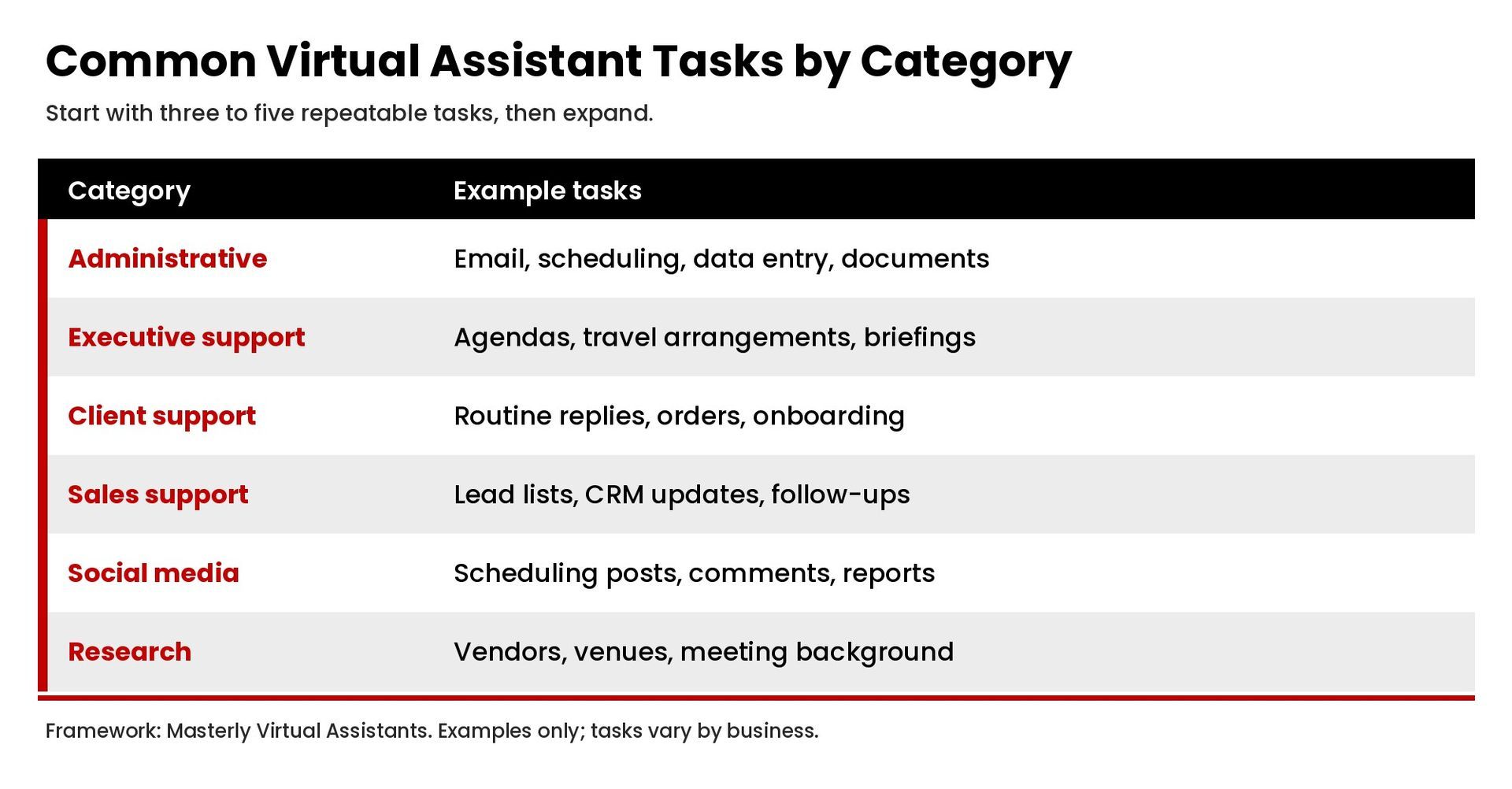
The examples below cover the virtual assistant tasks businesses most often delegate. You do not need to outsource all of them. Most owners start with three to five tasks and expand as trust and processes grow.
Administrative tasks
Administrative support is the foundation of most VA roles. A general virtual assistant or admin VA can handle:
- Email management. Sorting messages, drafting routine replies, flagging urgent items, and following up. Our guide to inbox management explains how assistants handle email day to day.
- Calendar and scheduling. Booking meetings, confirming appointments, resolving conflicts, and sending reminders. See our guide to calendar management.
- Data entry. Updating spreadsheets, CRM records, contact lists, and order data so information stays accurate and easily accessible.
- Document preparation. Formatting reports, proposals, presentations, and templates.
- File organization. Keeping shared drives organized so the team can find what it needs.
Executive assistant tasks
An executive assistant role goes deeper into supporting one leader. Typical tasks include:
- Managing the leader's calendar and protecting focus time.
- Preparing agendas, meeting notes, and follow-up action lists.
- Coordinating travel arrangements, including flights, hotels, and itineraries.
- Screening messages and keeping track of commitments.
- Preparing briefing documents before important meetings.
Customer and client support tasks
Clients notice when responses are fast and consistent. A virtual assistant can:
- Answer routine customer questions by email or chat on your behalf using approved responses.
- Process orders, returns, and appointment changes.
- Send onboarding materials to new clients.
- Track open requests and escalate issues that need the owner's attention.
Sales support tasks
Sales support helps the pipeline keep moving without the owner handling every detail:
- Researching prospects and building lead lists.
- Updating the CRM after calls and meetings.
- Scheduling sales calls and sending reminders.
- Preparing proposals and follow-up emails from templates.
Social media and marketing tasks
Social media is one of the most common areas businesses outsource. A virtual assistant can:
- Schedule posts across social media platforms using a content calendar.
- Monitor comments and messages and flag ones that need a response.
- Pull basic performance reports for campaigns.
- Repurpose blog articles and videos into social posts.
- Support email newsletters and marketing campaigns.
Creative and technical tasks
Specialized VAs often handle work that requires specific skills:
- Graphic design. Creating social graphics, presentations, and simple marketing materials from brand templates.
- Video editing. Trimming clips, adding captions, and preparing short videos for social media.
- Website updates. Publishing blog articles, updating site content, and checking for broken links. More complex web development usually calls for a specialist.
Research tasks
Research is time consuming but easy to delegate when the request is clear:
- Comparing vendors, software, or service providers.
- Gathering background information before meetings.
- Finding venues and options for event planning.
- Collecting market or competitor information for review.
Personal tasks
Some VAs also handle personal tasks for busy professionals, such as personal appointments, online shopping, gift orders, and personal errands that can be handled remotely. These tasks can return several hours a week to a business owner's life.
Virtual Assistant Tasks by Type of Business
The right virtual assistant tasks vary by industry. A few examples:
- Real estate professionals. Listing data entry, showing schedules, transaction checklists, and follow-up messages to leads. See our page for real estate agents.
- Coaches, consultants, and speakers. Client scheduling, session reminders, payments follow-up, event planning logistics, and social media scheduling. See coaches, consultants, and public speakers.
- Small law firms. Calendar coordination, intake scheduling, document formatting, and file organization, under the direction of the attorneys. See small law firms.
- E-commerce businesses. Order processing, product data, customer messages, and returns. See e-commerce businesses.
- Startup founders. Inbox and calendar support, investor meeting logistics, research, and CRM updates. See startup founders.
Example: A Day of Virtual Assistant Tasks
Here is an example of how daily tasks might look for a general virtual assistant supporting a busy business owner:
- Morning. Process the inbox, flag urgent messages, and send the owner a short summary of decisions needed. Confirm the day's meetings and appointments.
- Midday. Update the CRM after yesterday's sales calls, schedule follow-ups, and enter new order or client data.
- Afternoon. Schedule the week's social media posts, publish a blog article to the company website, and research two vendors the owner asked about.
- End of day. Send a progress update, list anything waiting on the owner, and prepare tomorrow's schedule.
Every business is different, but a predictable rhythm like this helps both the owner and the assistant track progress and save time.
What Are Some Good Tasks to Give a Virtual Assistant?
The best virtual assistant tasks share a few traits:
- They repeat. Tasks you do every day or every week are ideal because the time you invest in training pays off quickly.
- They follow a process. If you can write the steps down, a VA can follow them.
- They take your time but not your expertise. If a task does not require your judgment, skills, or relationships, it is a strong candidate.
- They have a clear outcome. Tasks with a defined result are easier to assign, track, and review.
A simple way to start: track your work for one week. Mark every task that is repetitive, low-judgment, or something you avoid. That list becomes your first set of virtual assistant tasks.
How Do You Delegate Tasks to a Virtual Assistant?
Delegating tasks well is what separates a VA relationship that saves time from one that creates more work.
1. Write a clear job description
Before you hire, write a job description listing the tasks, tools, hours, and communication expectations. A clear job description helps you find the right assistant and sets expectations from day one.
2. Document your processes
Record a short video or write step-by-step instructions for each task. Include examples of finished work so the VA knows what good looks like.
3. Start small
Assign a few tasks first, review the results, and give feedback. Add more tasks as the VA learns your business and your preferences.
4. Use shared tools
Use a project management tool to assign and track tasks, shared drives for documents, and a password manager rather than sending passwords in messages. Delegated access to email and calendars keeps accounts secure.
5. Set a communication rhythm
Agree on how and when you will communicate, such as a daily summary message and a weekly check-in meeting. Regular communication keeps tasks on track and makes it easy to adjust priorities.
What Skills Should a Virtual Assistant Have?
The right skills depend on the tasks, but strong virtual assistants usually share these:
- Clear written and verbal communication.
- Organization and the ability to manage multiple deadlines.
- Comfort with common business tools, such as email, calendars, spreadsheets, and project management software.
- Sound judgment about when to act and when to escalate.
- Discretion with confidential business and client information.
- Attention to detail in data entry, scheduling, and documents.
- Willingness to learn your systems and adapt to feedback.
For specialized work, such as graphic design, video editing, or bookkeeping support, look for proven experience and examples of past work.
Outsourcing vs. Hiring In-House: Which Tasks Fit a VA?
Outsourcing tasks to a virtual assistant works best for tasks that can be done remotely and measured by output. Tasks that require a physical presence, such as handling mail at the office or greeting visitors, are a better fit for in-house staff. Many companies use both: an in-house team for on-site work and a virtual assistant for administrative, research, and digital tasks.
When deciding what to outsource, consider the cost of your own time. If an hour of your work is worth far more than the cost of an hour of assistant support, outsourcing routine tasks frees you to focus on the work that grows the business.
How to Hire a Virtual Assistant for Your Tasks
Once you know which tasks to outsource, hiring becomes much easier. Start with your task list and job description, then decide whether you need a general virtual assistant or a specialist. A general VA handles a broad mix of administrative tasks. A specialist brings deeper skills in one area, such as graphic design, bookkeeping support, or video editing.
During interviews, ask candidates how they would handle two or three of your real tasks, which tools they use, and how they communicate progress. A short paid trial on actual work shows more than any resume. Many business owners also work with a virtual assistant company rather than hiring freelancers directly, so they have support with matching, onboarding, and coverage. Whichever route you choose, outsourcing works best when expectations are written down and reviewed regularly.
Outsourcing is not only for large companies. Most entrepreneurs who outsource even a few hours a week of virtual assistant tasks find they spend less time on their computer handling routine work and more time on engagement with clients and growth.
Mistakes to Avoid When Delegating to a VA
- Delegating without instructions. Vague requests produce vague results.
- Handing off everything at once. Too many tasks too early overwhelm a new assistant.
- Skipping feedback. Early feedback is the fastest way to get the results you want.
- Sharing passwords insecurely. Use delegated access and a password manager.
- Micromanaging. Once a process works, let the assistant own it and review results, not every step.
Frequently Asked Questions
What are the duties of a virtual assistant?
Common duties include email management, scheduling, data entry, customer support, social media support, research, document preparation, and travel arrangements. Specialized VAs may also handle graphic design, video editing, or website updates.
What are some good tasks to give a virtual assistant?
Repetitive, process-driven tasks that take your time but not your expertise, such as inbox management, scheduling, data entry, CRM updates, and social media scheduling.
What are the top skills needed for a virtual assistant?
Communication, organization, time management, tech comfort, attention to detail, discretion, and sound judgment about when to escalate.
How many hours of support does a business need?
It depends on the tasks. Track your delegable work for a week or two to estimate the hours, then start with a smaller commitment and adjust as tasks are handed off.
Start With the Right Tasks
Outsourcing the right virtual assistant tasks frees your time for clients, team, and strategy. Start with a short list of repeatable work, document how you want it done, and build from there. To explore how a virtual assistant could support your business, see our administrative support page or contact Masterly Virtual Assistants.