Social Media Virtual Assistant: What to Delegate and What to Keep In-House
A social media virtual assistant is a remote professional who handles the recurring work of posting, scheduling, community replies, and basic reporting so a business owner or social media manager can spend more time on strategy and creative decisions. The role is sometimes called a social media VA, a social media assistant, or, when the work sits inside a broader marketing brief, part of marketing and content support.
This article explains what a social media virtual assistant typically does, which tasks are listed on Masterly Virtual Assistants' own live service pages, and what most businesses should keep in-house. It does not include pricing. Task lists below come from virtual assistant tasks, marketing and content support, and the virtual assistants for social media managers page. If a task is not on those pages, this article says so and does not treat it as a listed service.

What a Social Media Virtual Assistant Does
Social media management is one of the most common areas businesses outsource. On the virtual assistant tasks page, the social media and marketing work a VA can handle includes:
- Scheduling posts across social media platforms using a content calendar
- Monitoring comments and messages and flagging ones that need a response
- Pulling basic performance reports for campaigns
- Repurposing blog articles and videos into social posts
- Supporting email newsletters and marketing campaigns
That is a practical starting list for small business owners who need a consistent presence without doing every login themselves. Posting consistently, tracking performance, and keeping a content calendar current are the essential tasks. They are not the same thing as owning the social media strategy.
A social media virtual assistant can be a generalist who also handles administrative tasks, such as inbox work, calendar management, and data entry, or someone whose brief is focused on social channels. The right mix depends on the business needs, the platforms in use, and how much of the work is already documented.
Tasks Masterly Virtual Assistants Lists for Social Media
The social media managers page describes virtual assistant services for people and teams who already run social media accounts and need help with the daily load. The live page lists these social media tasks:
- Managing social media accounts, including Facebook, Instagram, LinkedIn, Twitter, and TikTok
- Scheduling content and automating posts with tools such as Buffer, Later, or Hootsuite
- Responding to DMs, comments, and customer inquiries
- Researching trending hashtags and industry trends
- Creating graphics and coordinating with graphic designers
- Developing a content calendar aligned with a content strategy
- Engagement tracking and weekly performance analytics reports
- Assisting with lead generation through targeted campaigns
- Maintaining consistency across social media profiles and brand messaging
The same page lists related tools and skills, including Canva, Adobe Express, Trello, Notion, Google Workspace, content creation, basic video editing, social media analytics and reporting, campaign scheduling, competitor research, and comment and DM replies in a brand voice.
The marketing and content support page places this work in a wider brief. It lists social media management and scheduling (scheduling posts, tracking engagement, and managing audience interaction), content creation and graphic design, email marketing and campaign management, video and podcast publishing (uploads, descriptions, and release scheduling), website and SEO support, and marketing strategy and process support such as planning content and tracking deadlines.
Those are the social media virtual assistant services this article can describe with confidence because they appear on the live site. Paid advertising management, media buying, and specific key performance indicator targets are not spelled out as standalone offers on those pages, so they should be confirmed with Masterly before a business assumes they are included. Platform algorithms change, and this article does not claim that any assistant can control reach.
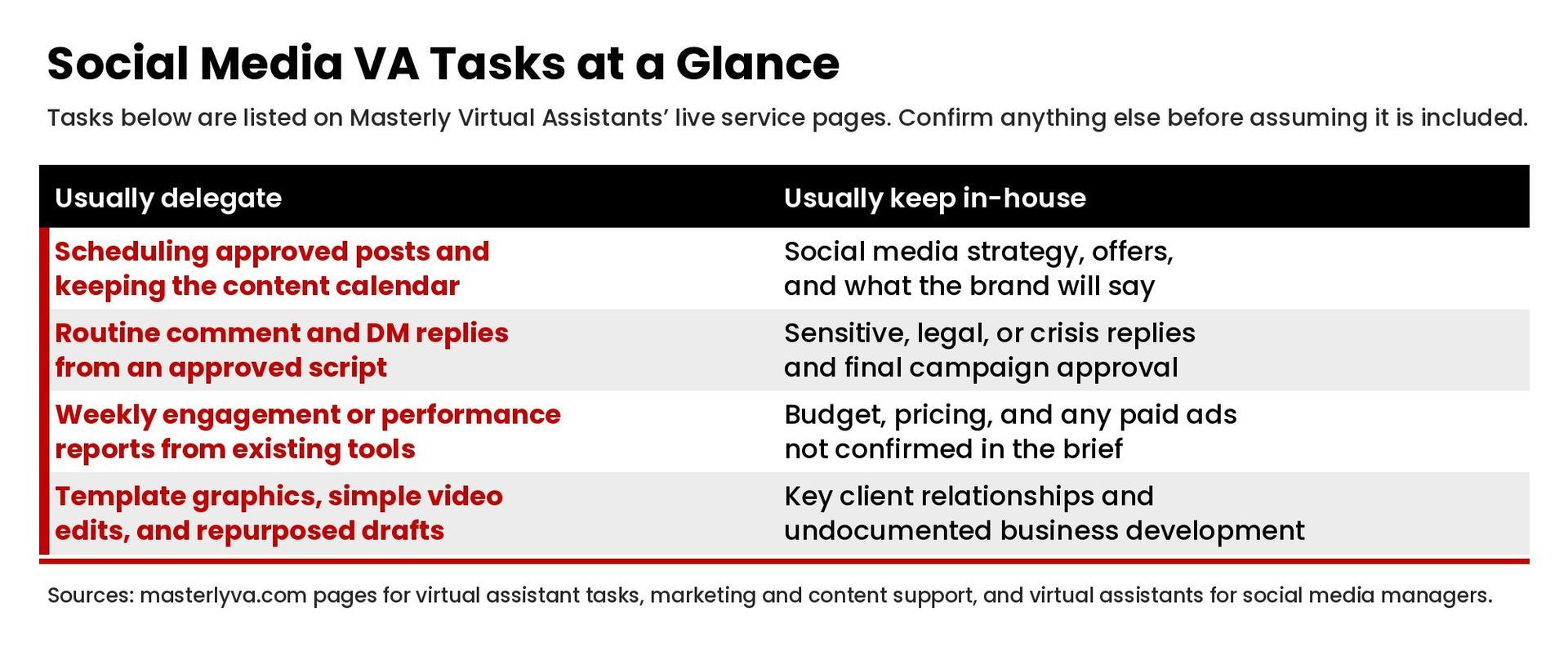
What to Delegate and What to Keep In-House
Delegation works best when the task is repeatable, documented, and easy to review. The virtual assistant tasks page makes that point for VA work in general, and it applies directly to social media.
Strong candidates to delegate
- Content scheduling and scheduling posts once the captions, assets, and dates are approved
- Maintaining the content calendar after the themes and cadence are set
- First-pass community management: watching comments and DMs, answering routine questions from an approved script, and flagging anything sensitive
- Basic reporting: pulling weekly performance metrics from the social media management tools already in use
- Graphic production from brand templates, and simple video edits for social posts
- Repurposing a finished blog post or video into platform-ready drafts for review
Work that usually stays in-house, or stays with the social media manager
- The social media strategy itself: positioning, offers, and what the brand will and will not say. Masterly's social media managers page frames the assistant's role as support so the manager can focus on developing strategy.
- Final approval of new campaigns, new claims, and anything that could affect customer satisfaction or legal or compliance risk
- The brand's voice when a reply is not routine: complaints, crises, or comments that need a human judgment call
- Budget decisions, pricing, and any paid advertising or targeted ad campaigns that have not been confirmed as part of the brief
- Relationships that should stay with the owner, such as key client conversations or business development that is not a documented, routine task
An effective social media strategy still belongs to the business. A social media VA helps execute it across social media platforms and keep a consistent presence on the social media networks the brand already uses. The manager or owner should still review early work, give feedback on tone, and decide what gets published when the stakes are high.
How a Social Media VA Fits a Small Business or an Agency
Small business owners often need help posting consistently and keeping a social media presence, or social presence, from going quiet. Social media marketing for a coach, consultant, or a specific industry still starts with the same fundamentals: a target audience, a content calendar, and social media trends researched in advance of each social media campaign. Weekly reports on social media performance can help by providing insights from the tools already in use. Hiring virtual assistants, including skilled virtual assistants or social media assistants, is one way to cover various platforms without asking the owner to live in every app. A social media virtual assistant can take the content calendar, use social media tools already in place, and handle content scheduling so the owner is not logging in every day. The owner still sets the themes, approves new offers, and steps in when a comment needs a personal reply.
Social media managers and marketing teams often need extra hands for multiple accounts. The social media managers page is written for that audience: agencies, creative professionals, and digital content creators who are already running campaigns and want help with scheduling, replies, graphics coordination, and reports. In that model, the social media manager keeps the strategy and the client relationship, and the assistant handles specific tasks on the accounts.
Masterly Virtual Assistants describes itself on that page as a virtual assistant company and a managed solution: it recruits, trains, and supervises professional virtual assistants rather than leaving a client to run a freelancer marketplace alone. This article does not describe a recruitment process, working hours, or a hiring process in detail beyond what that page states, and it does not quote rates.
If you are writing a job description or comparing options, start with the task list, the tools you already use, the brand's voice guide, and who will approve posts. A clear brief helps a skilled virtual assistant, or a team of virtual assistants, work inside the systems you already have.
How to Hand Off Social Media Work Well
The virtual assistant tasks page outlines a simple way to delegate any VA work, and it maps cleanly to social media:
- Write down the specific tasks, tools, platforms, and communication rhythm.
- Document the process: how posts are approved, where assets live, and what a good caption looks like.
- Start with a short list, review the work, and then add accounts or tasks.
- Use shared tools rather than informal password sharing. The social media managers page mentions productivity tools such as Notion, Trello, Canva, Google Workspace, and CRM software.
- Agree on how often the assistant will report and what the weekly performance report should include.
Remote professionals communicate in writing more than an in-office teammate would, so communication skills matter. The assistant should be able to communicate effectively in the brand's voice for routine replies and know when to escalate. High quality work on social media usually comes from a tight brief, not from handing over the logins and hoping for the best.
Frequently Asked Questions
What is a social media manager virtual assistant?
It is a virtual assistant who supports social media management: scheduling, community replies, calendars, graphics coordination, and reporting. The social media manager or business owner still typically owns the social media strategy. Masterly's page for social media managers describes that support role in more detail.
What does a digital marketing assistant do?
On Masterly's marketing and content support page, the broader marketing brief can include social media management and scheduling, content creation and graphic design, email marketing, video and podcast publishing, website and SEO support, and process support for campaigns and deadlines. The exact mix should be confirmed for each engagement.
What are the responsibilities of a social media assistant?
Typical responsibilities, based on the live pages cited above, include managing or supporting social media accounts, scheduling content, monitoring and responding to routine comments and DMs, keeping a content calendar, creating or coordinating graphics, and preparing engagement or performance reports. Responsibilities that are not listed there should be confirmed with Masterly before they are treated as part of the service.
How much do I pay a social media virtual assistant?
This article does not list prices. Compensation depends on the scope, hours, and skills required. To talk about support for your accounts, contact Masterly Virtual Assistants or call (888) 209-4055.
Is a virtual assistant still in demand? How do I get a job or market myself as a VA?
Those are career questions for people who want to become assistants. This article is written for businesses deciding what to delegate. It does not offer job-search advice.
Talk Through Social Media Support
If you want help with social media management, content scheduling, or a wider marketing and content brief, contact Masterly Virtual Assistants or call (888) 209-4055 to talk through the tasks you want to hand off and the work you want to keep in-house.